Equipment Repair Tracking Log
Equipment repair tracking log with free Excel and CSV worksheets for vendor handoffs, replacement serials, return checks and separate loaner closeout.
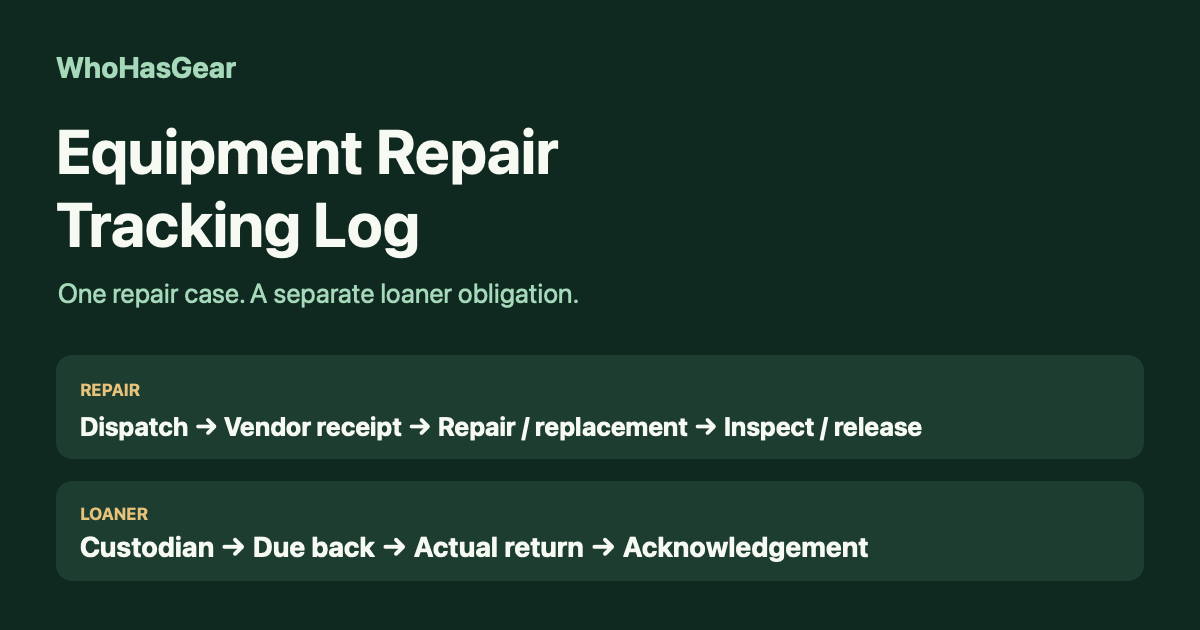
An equipment repair tracking log follows gear sent to an outside vendor, from dispatch through acknowledged receipt, repair or replacement, and inspected return. Keep any temporary loaner on a linked but separate record: getting the repaired item back does not mean the loaner came back too.
Summarize this article with AI
Summarize the manual repair and loaner workflow, keeping product and evidence limits clear.
Download the repair and loaner worksheets
Download the Excel repair tracking workbook for Instructions, a blank Repair Register, a blank Loaner Register and a fictional Worked Example. Each blank register has 25 editable rows, frozen headers, filters and wrapped columns.
Prefer your own spreadsheet? Download the header-only Repair Register CSV and Loaner Register CSV. Their columns match the workbook registers; CSV files do not retain workbook formatting or instructions.
This is a manually maintained worksheet, not a connected repair system. There are no macros, formulas, external data connections, vendor polling or automatic readiness certifications. A person must enter every update and review every open obligation.
What belongs in an external repair case?
Create one case for each outside repair round trip, not one permanent row for the equipment's entire life. A camera can keep asset ID CAM-014 while successive repairs receive different case IDs.
Record the fault and the removal-from-service date before the item leaves. Name one internal follow-up owner who can find the vendor's latest message and arrange the next action.
- Identity — Repair case ID, original asset ID, description, serial and current location.
- Vendor handoff — Vendor/contact, optional RMA or service reference, packing notes, dispatch date and shipment reference.
- Decision and return — Vendor acknowledgement, quote status and decision, expected return, actual receipt and repair outcome.
- Closeout — Replacement identity if applicable, inspection result, release authority/date, repair closure and linked loaner record ID.
Keep everyday instrument inventory and student assignments in your existing records. Our guide to school instrument tracking covers that broader job; this register starts when a specific item enters an outside repair case.
When is shipped different from received?
Shipped means the equipment left your custody; vendor acknowledgement means the repair provider confirmed receiving it. Record the dispatch date, any courier delivery date, and the vendor's acknowledgement date separately.
Sennheiser's US support article describes separate RMA/shipping-information and Repair Received emails. It also describes estimates for qualifying non-warranty repairs, payment messages where applicable, shipment tracking and an invoice after shipping.
That is a vendor-specific sequence, not a promise that every supplier uses those stages. Follow the actual vendor's packing, accessory and authorization instructions; record what you sent rather than assuming a standard kit.
How should quotes and delays be recorded?
Keep quote status separate from the physical location of the equipment. An item can be at the vendor while a quote is still pending, authorized or declined.
Enter the quote reference or amount with its currency, the decision-maker and decision date. The worksheet records that decision; typing Authorized does not grant purchasing authority or send an approval to the vendor.
- Pending — Assign an owner and next follow-up date instead of guessing a completion date.
- Authorized — Retain the approval reference and confirm the vendor has the instruction needed to proceed.
- Declined — Arrange return or another agreed disposition; a rejected quote does not bring the equipment home.
- Delayed or unrepairable — Record the latest evidence, current location and next action. Leave unresolved dates blank.
Keep a dated note when the expected return changes. An expected date is a planning estimate, not proof of dispatch or receipt.
What if the vendor returns a replacement?
Record the replacement as a different physical item while retaining the original identity. Match the received serial to the vendor's paperwork, then record the replacement asset ID and its current location.
Do not silently change CAM-014's old serial into the replacement serial. Record whether the original remains with the vendor, was returned unrepaired or has another documented disposition.
A vendor's completion notice is not your release decision. On arrival, enter the actual receipt date, inspect the returned item using your team's appropriate procedure, and record the checker, result and release authority.
Keep the item on hold if identity, accessories or condition remain unresolved. The worksheet cannot determine technical safety or replace a qualified inspection required for your equipment.
How do you keep the loaner from disappearing?
Give the temporary loan its own record ID and link it to the repair case. Record the loaner asset ID and serial, supplier or owner, named custodian, current location, date issued and due-back date.
Muscogee County School District's technical-support procedure records a loaner's asset tag, sends covered damaged devices to the provider, and checks the loaner in when returning the repaired device. That supports a separate handback step, not an assumption that one return closes both records.
For a vendor-owned loaner, record handback or shipping, actual receipt by the owner, and vendor acknowledgement separately. Use Not applicable for acknowledgement only when no external owner requires it, and explain why.
- Repair closed, loaner outstanding — Keep the loaner status open and follow up with its custodian.
- Loaner shipped — Keep tracking the return until the owner receives it and any required acknowledgement is recorded.
- Loaner closed — Record the actual return, required acknowledgement, closer and closure date independently of repair closure.
Worked example: replacement received, loaner still out
In this fictional example, Morgan Vale sends camera CAM-014, serial EX-CAM-014, to Northbank Repair under case REP-2026-001. The workbook's dated snapshots illustrate one case, not multiple repairs to enter in your live register.
The camera ships October 1, the courier marks delivery October 2, and the vendor acknowledges receipt October 5. Morgan authorizes the replacement quote October 6; the vendor completes the work October 8.
Replacement CAM-028, serial EX-CAM-028, arrives October 9. Rowan Ellis checks it and authorizes release to Studio cage A on October 12. The original remains with the vendor under the agreed replacement disposition.
The repair case closes October 12, but loaner LN-007, serial EX-LN-007, is still with Casey Reed. Its separate loan record LOAN-2026-001 remains Outstanding, due back October 14.
Casey ships the loaner October 13. Northbank Repair receives it October 14 and acknowledges it October 15; Morgan then closes the loan record. The workbook leaves return and closure fields blank in the earlier snapshot so no completed repair implies a returned loaner.
Why keep an actual return date?
Record the actual return date because a tick beside a repair does not tell the next coordinator when the item came back. It also leaves a weak trail when matching the repair to its paperwork.
In a June 16, 2019 Middle School Band Maven post, a band director described inconsistent use of a shared repair log and missing return dates. The revised process recorded the date and reconciled repair invoices with purchase-order records.
That is a historical firsthand school-team example, not evidence of current widespread demand or current practice at that school. The worksheet's optional PO/invoice reference supports that reconciliation without acting as an accounting system.
Verdict: use this for the vendor round trip
Use this workbook when one coordinator can maintain outside-repair handoffs and separately chase temporary loaners. Keep ordinary lending, master inventory and scheduled maintenance in their existing records.
It is not a purchasing approval system, a maintenance platform or a substitute for technical inspection. We have not tested vendor integrations, certified equipment readiness or measured how often teams encounter this problem today.
Once your team has inspected and accepted the repaired or replacement item, return it to ordinary custody tracking. The equipment checkout hub explains that workflow; the WhoHasGear demo shows the checkout experience, and WhoHasGear pricing lists current plans.
WhoHasGear is the publisher of this guide. This repair worksheet is separate from the product: no RMA integration, automatic vendor updates or repair-release automation is offered here.